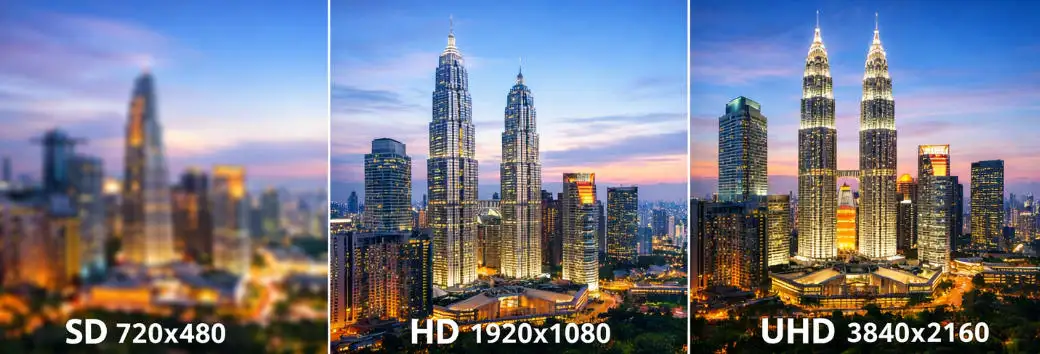
UHD vs HD vs SD: 최신 LED 디스플레이에 가장 적합한 해상도는 무엇입니까??
사람들이 디스플레이 화면을 비교할 때, 해상도는 일반적으로 그들이 가장 먼저 알아차리는 것 중 하나입니다.. UHD, HD, SD와 SD는 단순한 기술 라벨이 아닙니다.; 명확한 텍스트가 어떻게 보이는지에 직접적인 영향을 미칩니다., 얼마나 상세한 이미지가 나타나는지, 콘텐츠가 화면에서 얼마나 전문적으로 느껴지는지. 원본 기사에서, UHD는 3840×2160으로 설명됩니다., 친숙한 1080p 클래스로서의 HD, SD는 720×480 정도의 이전 표준 화질 수준입니다.. 오늘날의 디지털 간판 및 LED 디스플레이 프로젝트용, 해상도는 사양서에 적힌 숫자보다 더 중요합니다. 해상도가 높은 화면에서는 제품 이미지가 더 선명하게 표시될 수 있습니다., 클리너 글꼴, 그리고 더 부드러운 움직임, 이는 시청자가 디스플레이 가까이 서 있거나 몇 초 동안만 지나갈 수 있는 상업 환경에서 특히 중요합니다.. UHD가 하는 일, HD, 및 SD 평균? SD, 또는 표준 화질, 세 가지 형식 중 가장 오래된 형식이며 일반적으로 픽셀 수가 적고 이미지 디테일이 약합니다.. 기본 또는 레거시 애플리케이션에서는 계속 작동할 수 있습니다., 그러나 더 이상 현대 광고나 고급 시각적 프레젠테이션에는 적합하지 않습니다.. HD, 또는 고화질, 중간 지점이며 많은 비즈니스 디스플레이에서 가장 실용적인 선택으로 남아 있습니다.. SD보다 눈에 띄게 더 나은 선명도를 제공합니다., 하드웨어 및 콘텐츠 제공 요구 사항을 UHD보다 관리하기 쉽게 유지하면서. 원본 기사에서, HD는 이미지 품질과 효율성의 균형을 유지하기 때문에 상업용 화면의 가장 일반적인 일상 옵션으로 제시됩니다.. UHD, 또는 초고화질, 세 가지 중 가장 높으며 시각적 세부 사항이 가장 중요할 때 일반적으로 사용됩니다.. 훨씬 더 높은 픽셀 수로, UHD는 프리미엄 광고에 더 적합합니다., 대형 시청, 멀리서도 생생하고 세련되게 보여야 하는 콘텐츠와. 실제 사용에서 세 가지 형식을 비교하는 방법 SD의 실질적인 차이점, HD, UHD는 ...
자세히 알아보십시오